

Best Route Planning Software in 2026
This guide compares Track-POD, RouteManager, Circuit, and Upper, covering features, pricing, routing quality, and best-fit scenarios to help businesses choose the best route planning software for 2026.
Read More
"Labels are a carrier problem. If you run your own vans, a printed manifest and a driver who knows the round are enough"
Wrong.
In-house delivery operations need shipping labels as much as national carriers do. A wrong parcel on a multi-drop route costs you a redelivery, a phone call and, often enough, the customer.
With shipping labels, drivers can scan packages before departure and upon arrival to confirm every parcel reached the right stop. But let's not get ahead of ourselves just yet.
Shipping labels play an essential role in the optimization of your workflows.
Printed labels can be scanned as part of the POD process.
The shipping label sizes can vary. Your labels can be large, or they can be small and neat. It depends on what needs to be printed. Some operations use bar codes or QR codes on their labels. These codes enhance the efficiency of your operations. They will, however, need a larger sized label.
Let's see, step by step, what shipping labels are, how they help delivery operations stay organized, and how dispatch teams can utilize them to improve delivery success.
What shipping labels do for a delivery operation
Generating shipping labels without extra hardware
How to print shipping labels in bulk
A shipping label is a document that contains all essential information required for the courier to execute the delivery successfully.
As a rule, a shipping label will contain all essential order info:
Back in the day, this information would be written on the package by hand. In fact, this is still done by some delivery operations that don't do load confirmation via barcode scanning.
Present-day shipping labels contain unique barcodes and/or QR codes that allow couriers to quickly scan the packages before departure and upon arrival at the customer's location.
The addition of a bar code on a shipping label improves efficiency. It’s difficult to make a mistake when scanning barcodes.
Some labels include QR codes as well. A QR code is a type of two-dimensional matrix image. It has more functionality as it contains more information than a barcode. A wider range of equipment can be used for scanning QR codes.
A Track-POD mobile app provides scanning functions for barcodes and QR codes.
Below is an example of a shipping label template generated via Track-POD route planning software.
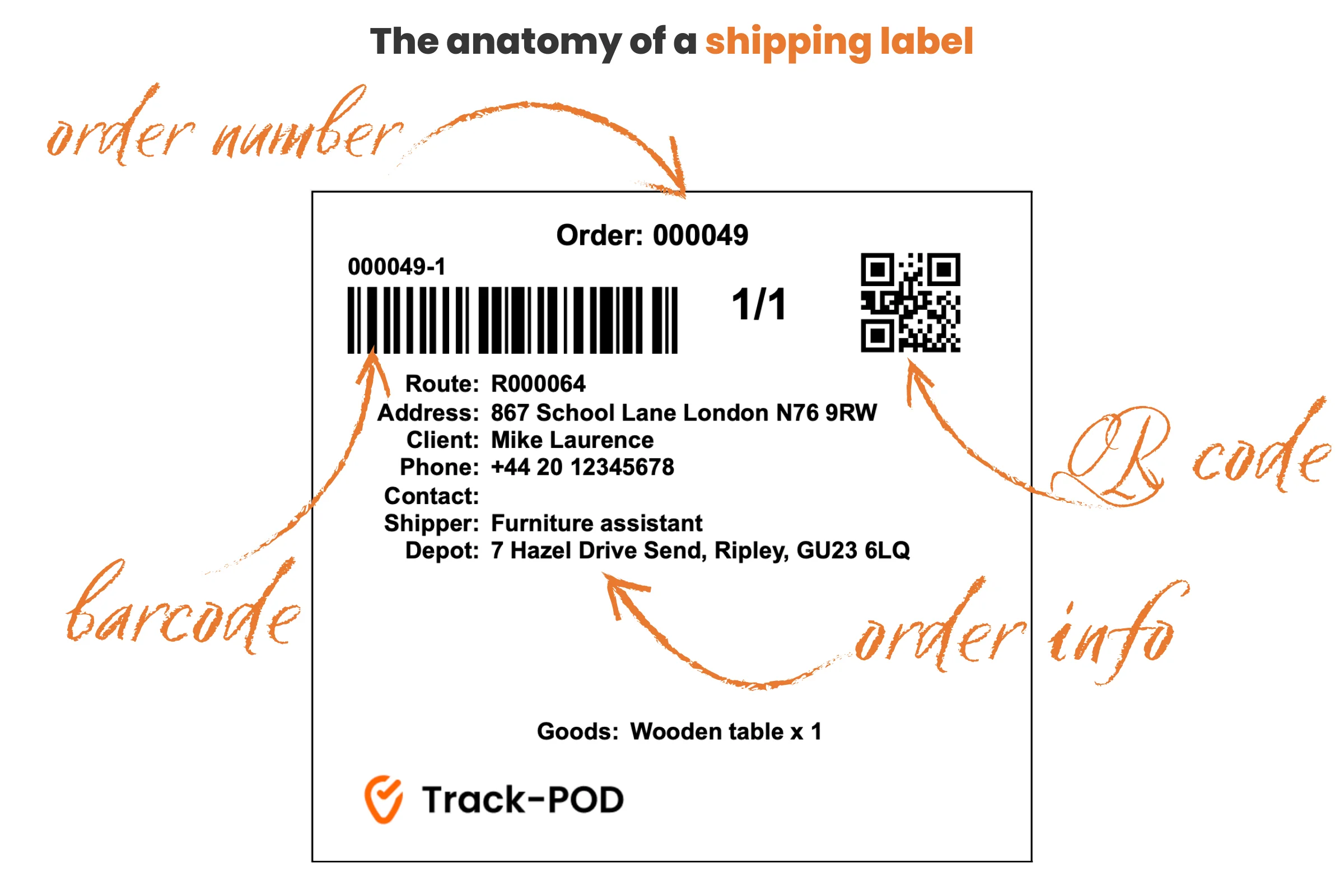
The advantages are practical ones: all order info at the driver's fingertips, a load check that takes seconds, and delivery confirmation you can stand behind.
Let's take a closer look at each.
Checking packages with handwritten names or addresses takes time. This time impacts your estimated time of arrival (ETA) and creates unnecessary delays in the delivery process.
Even if your fleet utilizes cutting-edge routing tools and mobile applications, physical package labels remain the quickest, most reliable method for identifying items on a route.
Printing shipping labels saves time for your couriers to deliver good customer service: locate the right package fast and deliver it on time.
Thanks to the accurate order info on the shipping labels, you can improve your delivery KPIs and overall customer service quality.
To complete the delivery experience for your customers, you can also offer last mile delivery tracking to customers via SMS and email delivery notifications. Then they can track packages and see the delivery progress in real-time.
No matter how precise your load planning strategy is, any truck with multiple packages for multiple customers on board offers room for error.
Using route planning software, like Track-POD, you can print out shipping labels that include a unique barcode for each order or each item in the order.
By swiftly scanning every package before departure your couriers can be sure that all the packages belong to the right orders and are loaded in the correct sequence.
Track-POD's driver app will notify your couriers if the shipping label is unrecognized or scanned twice. In the same way, the dispatchers can look at the dashboard to see if the order was actually scanned or simply marked as scanned.
Shipping labels help to systemize and simplify the load check process. Efficient load check, on the other hand, helps to cut down on the number of shipping errors, missed packages and cases of returns and re-arrivals.
Delivery confirmation is a key part of any logistics workflow.
Proving a successful delivery is just as important as executing a successful delivery because if the customer thinks you made a mistake you need to be able to prove otherwise.
Using shipping labels, couriers can, first of all, check the customer's name and address while on location.
Second of all, they can scan the label to get a confirmation that the package was delivered to the correct address.
Scanning parcels upon arrival will help to minimize not only missed deliveries but also customer complaints and loss of trust.
Operations that label every parcel usually stop at the same question: what does it take to set up.
Making, printing and scanning shipping labels sounds like it needs a stack of tools the dispatch office doesn't have, like a label printer, handheld scanners, a separate labelling system.
It doesn't.
The good news is that all you need to make and print a label for shipping is route planning software.
The same software that makes multi-stop routing and optimization possible in the first place.
Track-POD also offers web dashboard printing. Access the Plan & Track Orders dashboard, select an order, and print the shipping label. You can give your shipping company or courier access to the shipping label generator online. They will need access to the dashboard for this.
As for label scanning, there are mobile apps for delivery drivers that come with a free QR and barcode scanner, like Track-POD.
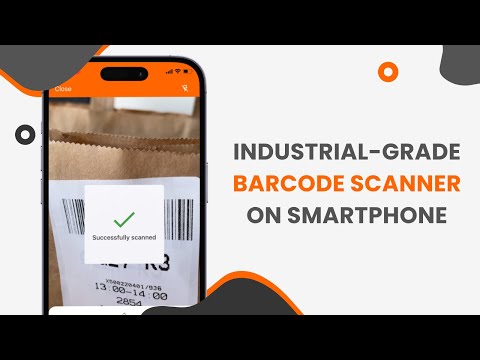
Barcode scanner comes with the Track-POD driver app, which means no extra hardware is needed.
Right from the Track-POD's Plan & Track or Orders dashboards, you can select any order and access the automatically generated shipping label in a matter of 2 clicks.
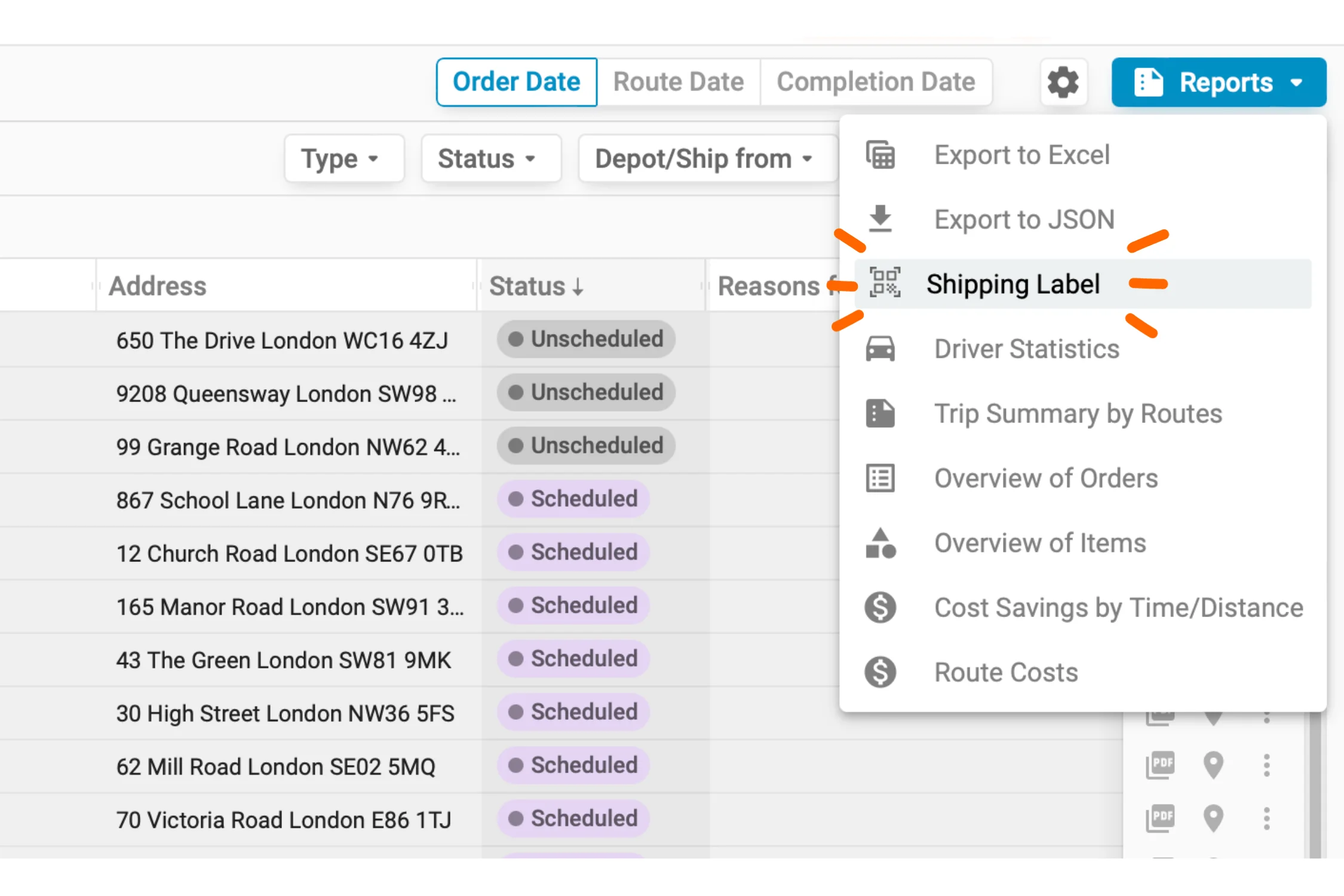
Your label carries whatever your operation needs it to carry. No matter how big or small the label is, you can add custom information, and it stays professional and easy to read.
You can print shipping labels in bulk by selecting multiple or all of your orders for the day.
You can quickly print shipping labels from the Plan & Track and Orders dashboards. Shipping labels can also be created for orders that have not yet been scheduled and do not correspond to any route.
Your labels for shipping will simply open in a new window that you can send to your thermal printer or any regular office printer you have.
Note that your shippers or courier company can print shipping labels too. It makes it easier to delegate shipping to a third-party by simply adding an additional dashboard user.
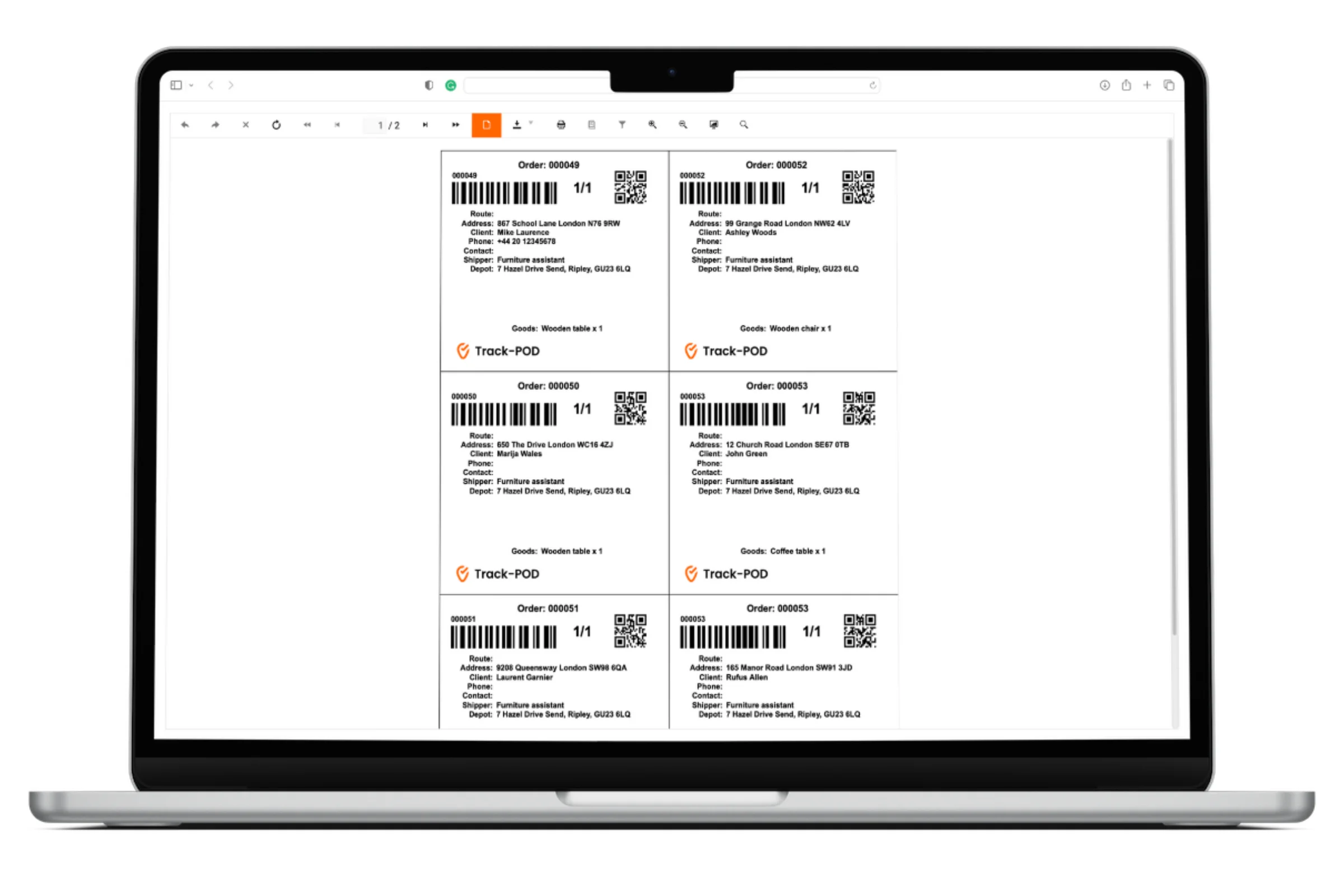
Track-POD software doesn't require you to use a thermal label printer. If you choose to print labels on paper and then secure them on the packages with clear plastic address pouches, that's completely fine.
As you can see, printing shipping labels doesn't require any extra equipment that you don't already have in the office.
Depending on your printer, you can choose between the following formats of Track-POD shipping labels:
With simple, versatile tools like multi-stop route planning software and a mobile app for the driver, you can easily implement shipping labels into your delivery workflow.
Stick your shipping label in the best place for scanning. Dispatch staff need to scan a pile of parcels stacked on top of each other, so place the label on the side of the box that will be exposed to the scanner.
Your shipping label will contain name and address details, the order number and a description of the goods. It may contain a barcode and a QR code.
The system provides the information for printing the labels. If you need extra information on there, the label has to be customized to read it. Your system administrator handles that.
Once set, the layout is something that needs to remain as static as possible. Drivers and warehouse staff learn where to look.
Shipping labels are not something reserved for major transportation companies.
Any operation running its own deliveries can make and print labels to guarantee secure and speedy delivery of packages regardless of quantity, and to keep a scan record from the moment a parcel is loaded to the moment it's handed over.
We hope this article on how to make and print shipping labels inspires you to take your delivery workflow to the next level.
If you're curious about Track-POD shipping labels, the free barcode scanner, or other last mile delivery solutions, book a demo to get a guided tour.

This guide compares Track-POD, RouteManager, Circuit, and Upper, covering features, pricing, routing quality, and best-fit scenarios to help businesses choose the best route planning software for 2026.
Read More
Guide for starting an e-commerce distribution business: learn about tech reliance and challenges, market research, legal considerations, and efficient route planning considerations.
Read More
Not all delivery operations will be successful enough to grow. But all delivery operations need to make room for growth - otherwise growth will be stalled by the sheer inflexibility of processes.
Read More